
According to Expedia Group, travelers spend an average of thirty-eight days researching a trip before they book it. Part of that research is likely researching airfare and waiting for a really good one. Your best bet is to subscribe to alerts from a flight price tracker that will tell you when a fare drops or an especially good deal appears. These airfare alerts differ from the many general “deal” bulletins you can receive. Instead, they’re keyed to specific travel dates, air routes, and sometimes even airlines—a kind of “set it and forget” for travelers who don’t want to go hunting for the cheapest airfare. We explored each
The 6 Best Flight-Price Trackers
Several options generally rise to the top of most evaluations. Here are the top five, in no particular order, plus what makes each one stand out, followed up by some broader flight-tracking options:
KAYAK
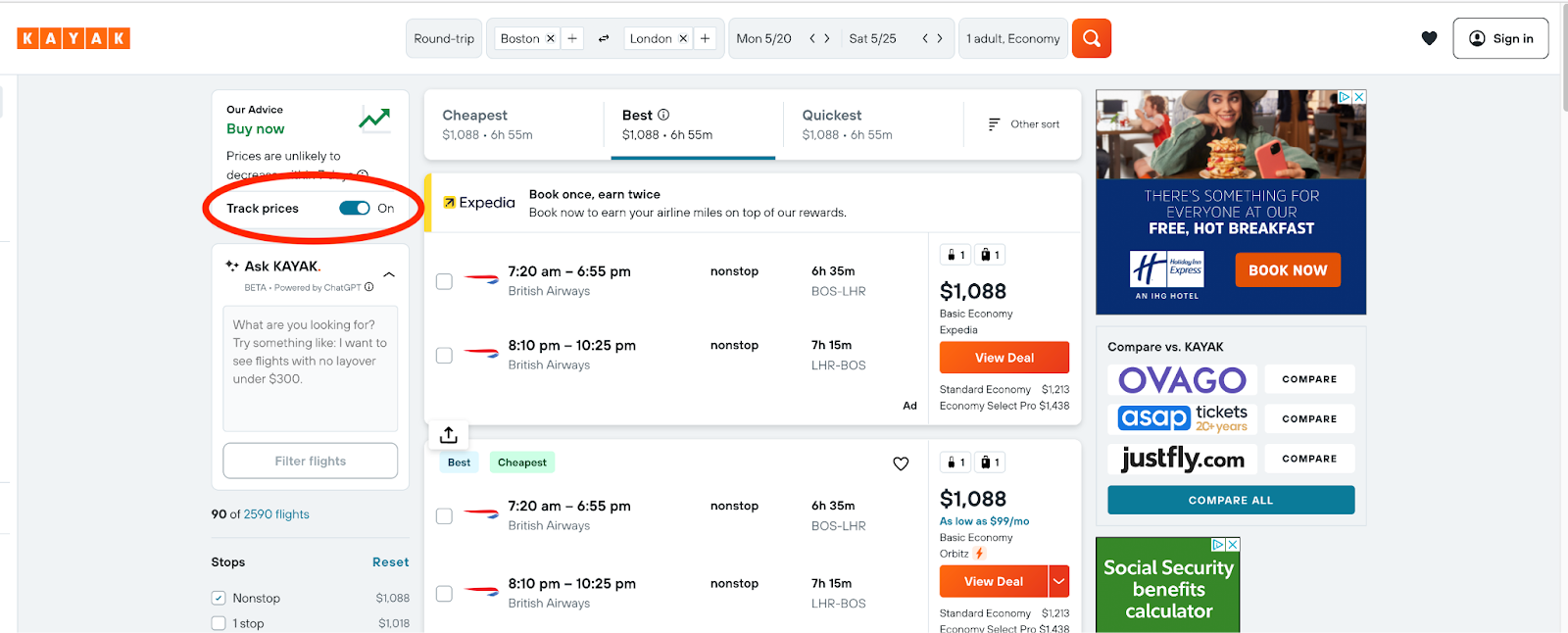
KAYAK (part of the Booking.com empire) is a robust flight price tracker. You can tailor the tracking filters as tightly as you want: by destination, class of service, number of stops, and more. KAYAK can also track hotel prices. Both are possible by selecting the “Track Prices” switch on the left side of the results page once you’ve searched for your specific dates.
Pros of Kayak: It shows Southwest if it is an option for the route you are searching, but does not show you the price is, have to click through to the southwest website.
Cons of Kayak: Does not offer a loyalty program, so if you book through them there is no incentive for points.
Skyscanner
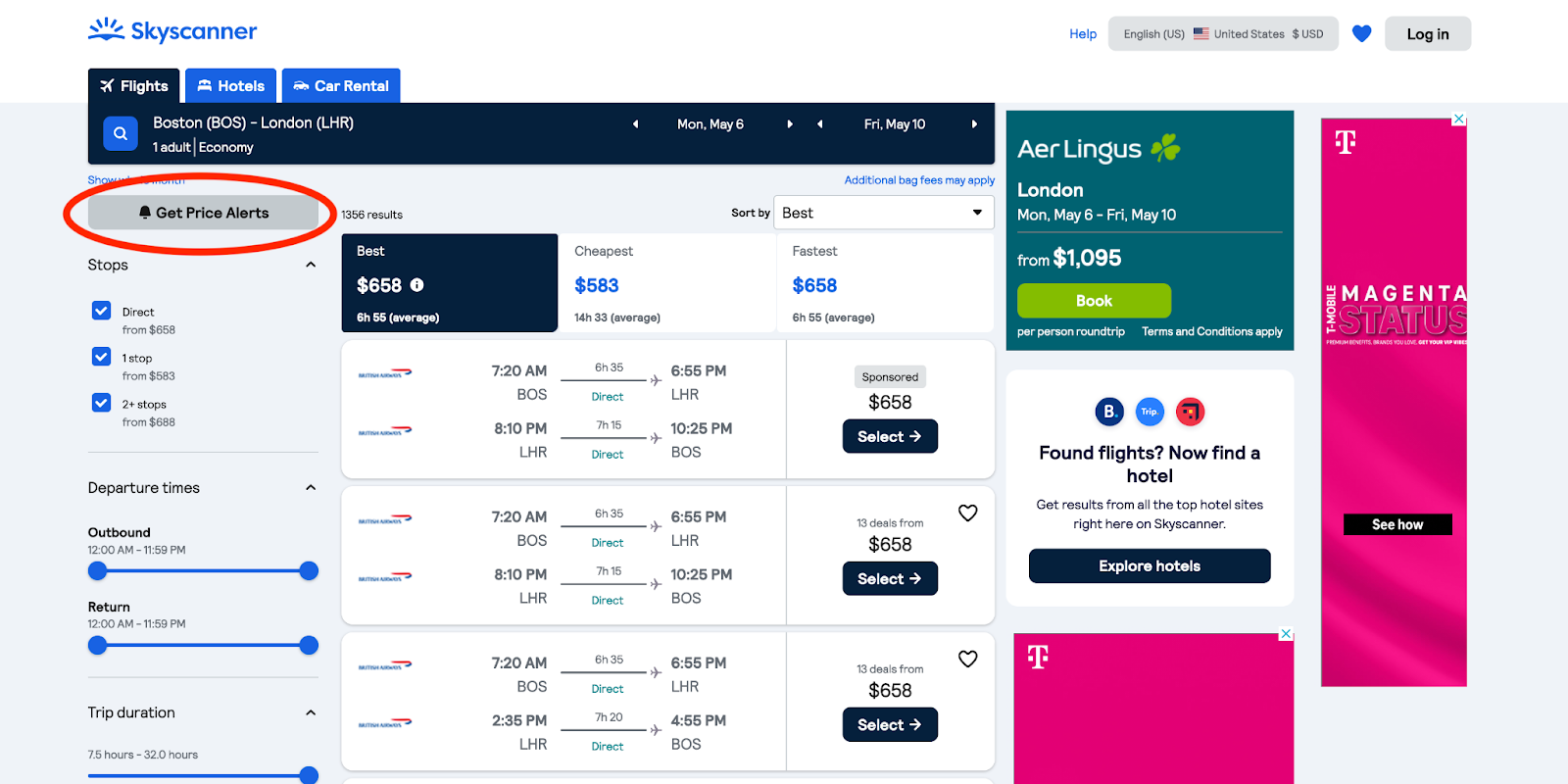
Skyscanner, a London-based metasearch system, operates in much the same way as KAYAK. The “Get Price Alerts” button on the search results page enters your trip(s) into the system, and you can manage your account for details.
As with KAYAK, this flight price tracker doesn’t include Southwest fares. And although it can search hotels, it does not offer a tracking function for them. Skyscanner’s “Get Price Alerts” option on the left side of the results page allows you to choose from email, Facebook, and Google to create an alerts account and start getting emails easily—all you have to do is enter an email address for them to be forwarded to.
Pros of Skyscanner: Real time fare comparison is like no other site, advanced search options.
Cons of Skyscanner: Displaying of ghost fares that are no longer valid.
Hopper
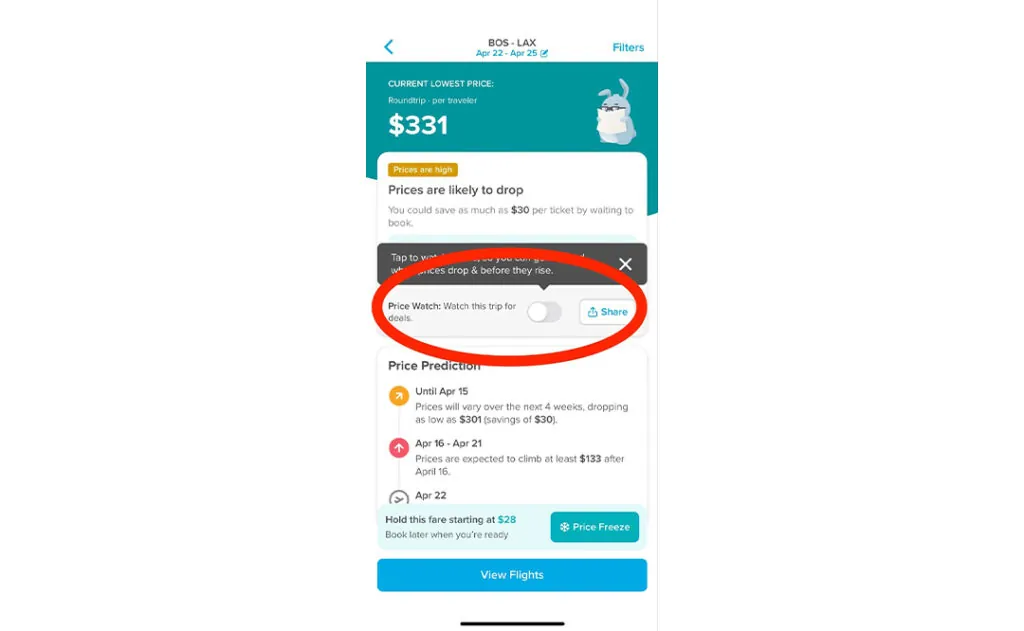
According to SaleCycle, the majority of travelers browse for flights on their phones but book them on their computers. Hopper may change that as a mobile app for iOS and Android phones, perfect for those glued to their phones. When the price of a fare drops, you will receive a notification directly on your phone, which you can click on to review the fare. There are no emails to check; just click on the alert.
They have a great prediction model that tells you if the fare is high and when they think it will drop, so you know when to be on the lookout for those alerts and get ready to book.
Pros of Hopper: Best tracking when using your phone to book airfare.
Cons of Hopper: Filters are not as extensive as other sites.
Airfarewatchdog
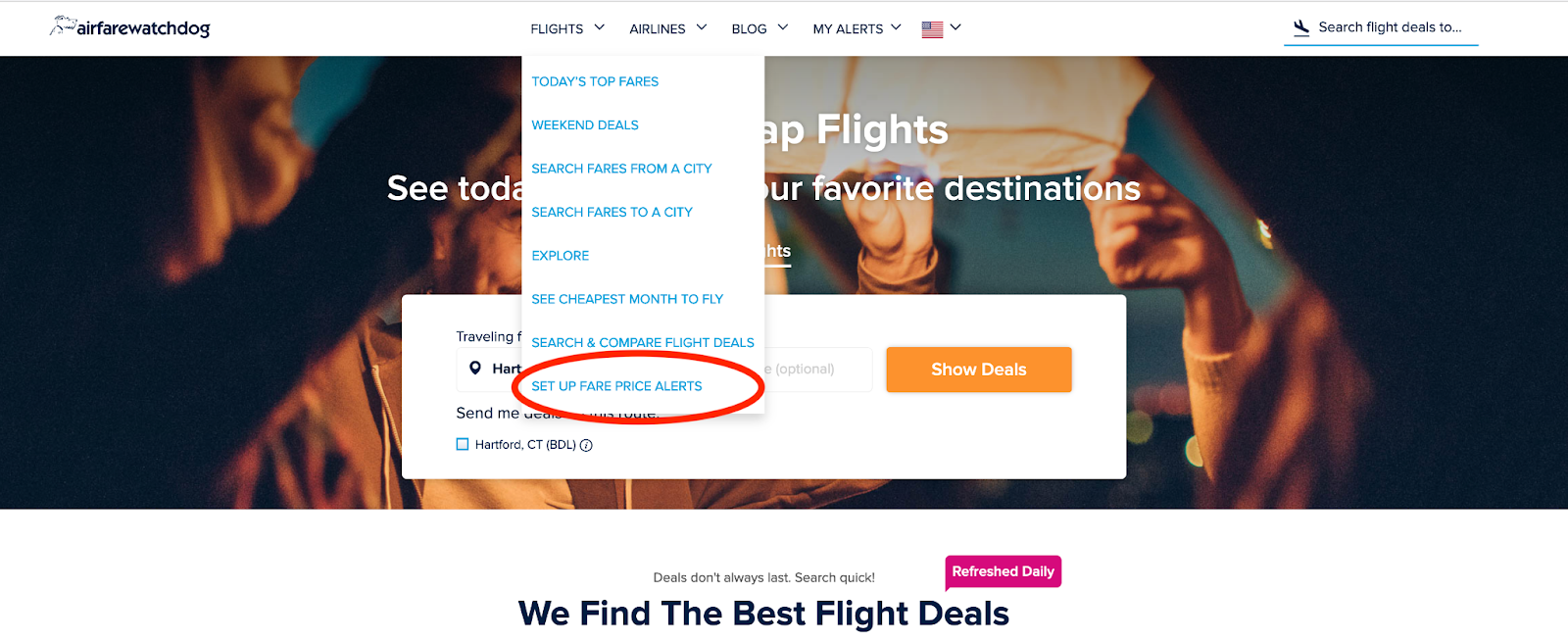
Airfarewatchdog, SmarterTravel’s sister site, will send you an alert the instant a price goes down so you can snag it before it is gone. Choose from a specific route or all deals from a specific departure city.
Adding cities and routes is straightforward and simple, even after you have signed up- you can easily update your alerts without having to dig around. You can choose how often you want to get alerts, either up to seven times a week, three times a week or once a week.
Pros of Airfarewatchdog: Their Do-Not-Send Airlines option. Hate Spirit? Have a disdain for American? You can easily add the airlines you don’t want alerts from under your account settings.
Cons of Airfarewatchdog: Some fares you get alerts for are hard to find on the site.
Google Flights
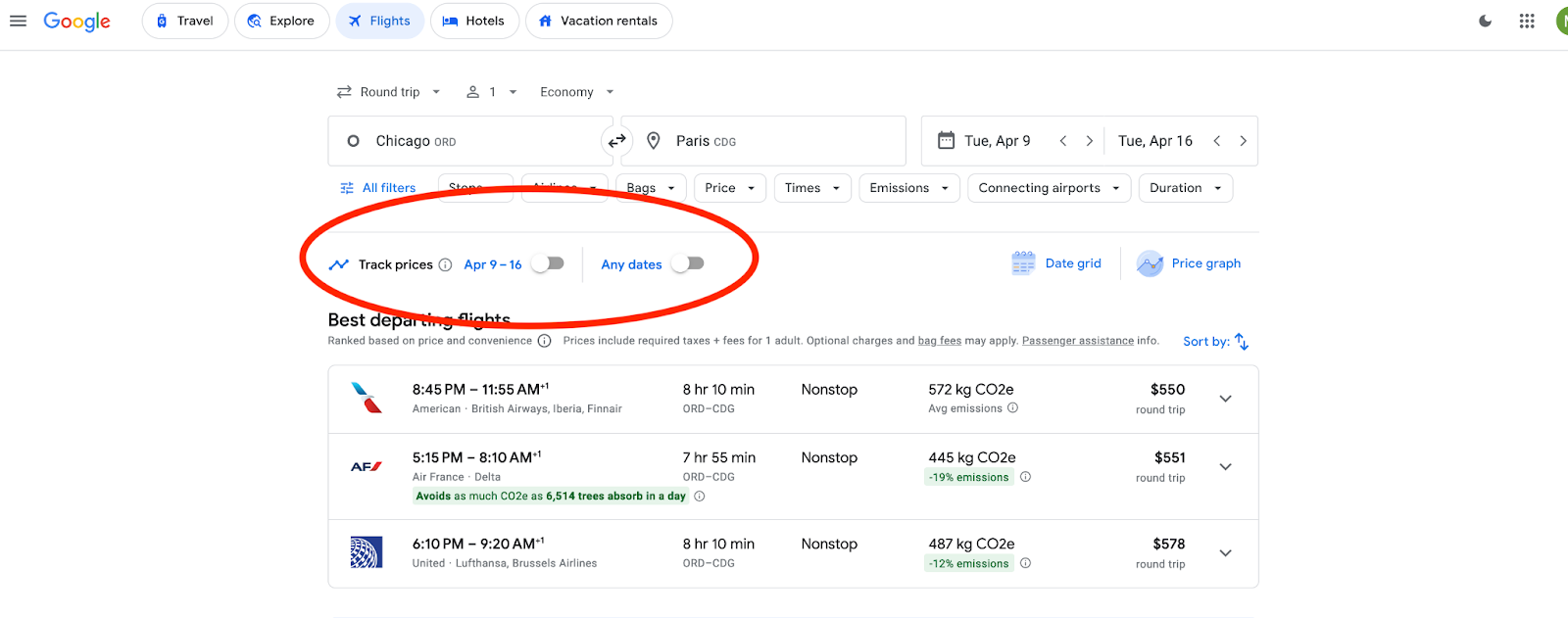
Lastly: Not a website so much as a broader platform built into the internet giant Google, Google Flights provides an outstanding range of choices for tracking flight prices. For any trip of interest, you can enter an origin/destination, travel dates, how many tickets you want, and class of service, plus screening for the number of stops and other variables to track as many individual flights as you want. notifies you if the fare goes below the value when you first entered the search. It covers most airlines except for Southwest, which does not provide its fares to any metasearch systems. It notifies you by email on as many specific searches as you set it to. Google Flights does not include hotels. As an added bonus, Google Flights will also tell you the cheapest time to fly to a given destination, or the cheapest place to fly in a given time period, if you’re unsure of where and when to travel.
Pros of Google Flights: You can choose if you want to get alerts for specific dates or just for the route you are searching for in general, no matter the date – you just want the best price.
Cons of Google Flights: They don’t always display the lowest price available.
Going

Going, (previously Scott’s Cheap Flights) is a membership-based model. You can choose from three tiers: free, premium, and elite. The higher your status, the more deals you will be sent, and the more likely you will get the best deal for the routes/cities you choose. The paid memberships only make sense for people who travel a lot, otherwise, if you are just looking for a good deal, there is no need to pay for a membership.
Going is by far the most aesthetically pleasing airfare site out of all the ones we have mentioned. Each deal is accompanied by a photo of the destination (or of an airplane) and has a generic price range listed, making fares seem cheaper than they might be but making the user feel like they are getting a deal.
Pros of Going: Easy step-by-step alert sign-up.
Cons of Going: They make it seem like you need a paid membership to continue, but you don’t. A Skip button is in the upper right-hand corner of all the sign-up pages as you set up your account.
For premium fares (premium economy, business, and first-class), you can use any ITA Matrix-based site, which covers all fare classes. Those who want more detailed information on first—and business-class deals, however, can subscribe to several paid sources like First Class Flyer and Notiflyer, starting at $99 per year. Read more about where to find deals on premium airfare here.
Additional Tips for Finding Cheap Flights
- Be flexible with your travel dates and times. Weekdays and off-peak hours are generally cheaper than weekends and holidays.
- Consider flying into budget-friendly airports or nearby regional airports.
- Sign up for email newsletters from airlines you prefer to receive updates on promotions and sales.
Following these tips and leveraging flight price trackers can significantly increase your chances of scoring the best deals on your next airfare purchase.
You Might Also Like:
• Airport Security Frequently Asked Questions• The Cheapest Caribbean Islands to Visit
• SmarterTravel Spotlight: Pelham on Earle Review
• 8 Tips from a Flight Attendant’s Daughter to Save Money on Your Next Flight
• 6 Savings Secrets for Senior Travel
We hand-pick everything we recommend and select items through testing and reviews. Some products are sent to us free of charge with no incentive to offer a favorable review. We offer our unbiased opinions and do not accept compensation to review products. All items are in stock and prices are accurate at the time of publication. If you buy something through our links, we may earn a commission.
Top Fares From




Today's Top Travel Deals
Brought to you by ShermansTravel
France: 8-Night Paris, Avignon & Nice...
Infinity Worldwide Vacations
 vacation
$2880+
vacation
$2880+
Poconos: 3 Nts in Garden of...
ResortsAndLodges.com
 hotel
$305+
hotel
$305+
7-Nt Canada & New England Cruise,...
Princess Cruises
 cruise
$839+
cruise
$839+